Why some (or most) of my projects aren’t open source.

Every time I make a project, I get a sort of DM, email, or comment, which goes like: “Repo link?”, “Is this on GitHub?”, or the classic “Open source when??”

I get it. The dev community thrives on sharing. But if you look at my GitLab profile, you’ll see Tiny Taskbot, my File Organiser, and maybe a few other bits and pieces… but you won’t see my greatest projects.

People think I’m being stingy, or that I hate open source (which I don’t), but there’s a method to the madness. Here is why most of my work stays under lock and key…


1. The “Google” Logic (Granular Control)

Let’s be real: Google doesn’t host the source code for Search or Gmail on a public repo just because the UI looks nice (thanks M3E!).

When a project is truly excellent, when it’s high-performing or solves a specific problem perfectly – keeping it private is about granular control.

When you open-source something, you aren’t just sharing code; you’re often inviting a chaotic committee of opinions, feature requests, and forks.

Sometimes, I want a project to stay exactly what I envisioned it to be, without the pressure of making it “universal” for everyone else’s edge cases.

I do not want to spend my day closing PRs that have no logical meaning… “Oh, your CSS has 1 extra space”, or “Here, I changed the <h1> to a <h2> for no reason at all”... I’m not hating on these people, just to reiterate, but… It’s not worth calling out tiny problems.

2. The Mechanic’s Philosophy

I view my old or “stale” code a bit like a project car.

If I have a script that’s looking a bit ugly or I’ve moved on to a newer version, that is when I’m likely to release it into the wild. Why? Because it’s like a mechanic giving you a car that needs work.

You wouldn’t go to the mechanic every day to fix a minor problem you can fix yourself.

By releasing the “stale” stuff, I’m giving people a foundation to tinker with. It’s a learning tool. You get to get your hands dirty, fix the “ugly” parts, and learn how it works under the hood. It’s more rewarding for the user and less of a maintenance headache for me.

3. The Quality Filter

I have high standards for what I put my name on publicly. If a project is “excellent,” I might be keeping it private because it’s a competitive advantage (think Train Times) or a personal tool I’m still refining.

If it’s public, I want it to be helpful, like my file organiser. If it’s private, it’s usually because it’s either:

  1. Too precious to let the internet break it.
  2. Too “secret sauce” to give away for free.

So, what’s next?

I’m actually working on a new open-source project right now that I think you guys will actually find useful…

I can’t share much information yet, but keep taking a look here at my blog; I’ll post updates.

Until then, keep tinkering with the projects I have put out there. Just don’t expect the keys to the entire kingdom just because the CSS looks pretty.
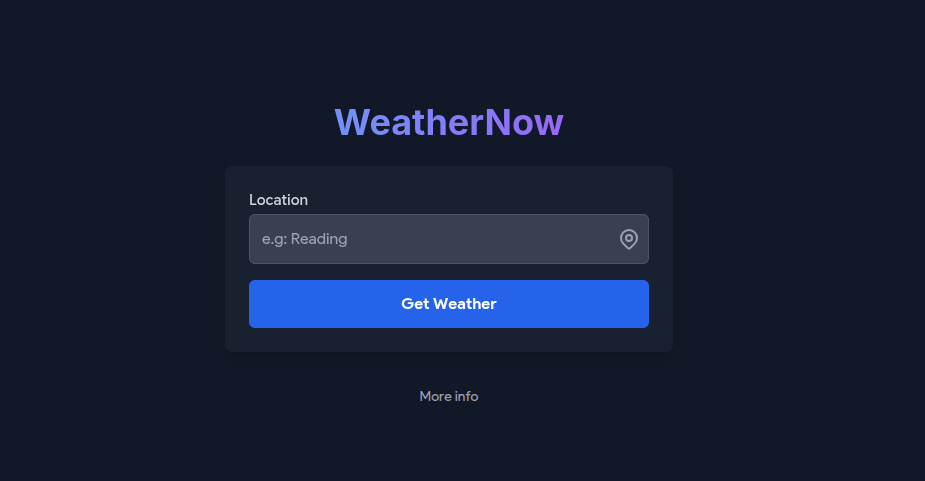
Exciting updates for WeatherNow is coming!

WeatherNow Picture
The current WeatherNow interface.

Hey there!

I’ve been working behind the scenes on WeatherNow (as the sole creator really), and I’m really excited to share some of the improvements that are coming your way.

The goal? To make checking the weather faster and easier for all to use.

Here’s what’s being added:

  • Google Maps Integration: Soon, you’ll be able to see the location you’re checking directly on a map. This means no more guessing where that tiny town is, or wondering “Where the heck is Henley?”… You’ll get a visual overview right on the page. (Just a note: this feature will be subject to a limit to make sure I won’t have to pay for the expensive subscription, but it should still make navigation a lot smoother. There will also be a function to turn it off in a new Settings panel later if you do not wish to use the map.)
  • Wind Speed Conversion: Some people prefer mph, others km/h, or if you’re a pilot, knots… I’ll be adding a simple way to switch between units so you can see the wind speed in whichever format makes the most sense to you.
    • (Yes Europeans, you can now celebrate that km/h will be there.)
  • Improved Search Functionality: I heard searching for locations hasn’t always been the smoothest (e.g. Giving wrong towns, or saying a place doesn’t exist when it does). I’m working on making it faster and smarter, so it shouldn’t really happen again.
  • Updated Icons: Weather icons are getting a fresh look, they currently look clipped and messy. They’ll give the site a more modern feel, but I will try and keep some consistency though.
  • Faster Performance: I’m updating the site’s code to the latest standards. That means WeatherNow will load slightly faster, animations will feel smoother, and overall performance should be noticeably improved.
  • Better PWA (App) Integration: WeatherNow is already a PWA. However, I will be taking advantage of several new PWA features to make the app… feel like an app.

I’ll be rolling these updates out gradually in January-February 2026, and I can’t wait for you to try them out. If you notice something that could be better or just have ideas for the future, please do contact me. Your input really helps me make sure I am doing the right thing 😉

— David

The death of the (internet) cookie?

Photo by Vyshnavi Bisani on Unsplash

When you think of a cookie, you probably imagine the food.
Warm. Soft. Delicious… Yum yum.

Unfortunately, the cookies I’m talking about here are nowhere near as exciting. You can’t eat them. They don’t crumble. They don’t go well with tea. Internet cookies are more like… tiny, invisible sticky notes your browser collects whether it likes it or not.

“So David, what are they then?!”

Ahem….
A cookie is basically a small piece of data stored by websites. Most of the time, they’re harmless little things that help the site remember who you are and what you were doing. Think of signing in to a website without cookies, every time you clicked a link or refreshed the page, you’d be kicked out and asked to sign in again.

Very frustrating. I know.

Cookies keep things running smoothly: your login info, what’s in your shopping basket, your theme preferences, your “I’m dark mode till I die” setting… That kind of stuff.

So why am I here, ominously calling this “The death of the internet cookie” like I’m narrating a crime documentary on Netflix?

The downfall begins…

The issue is this: not all cookies are cute and cuddly. Some are… weird. Creepy. The “why do you know where I live, why I wrote an article about the train companies being foreign, and which video I paused at 3:12 last night” kind of creepy.

These are third-party cookies.
Imagine you’re shopping at Tesco, but someone from Asda is following you, taking notes, and then shouting “HEY! I SAW YOU LOOKING AT LASAGNE! WANT MORE LASAGNE?” the next time you’re online.

That’s basically how online ads have worked for years…

Naturally, people got annoyed. Governments got annoyed. and browsers got annoyed.

So big tech companies Google, Mozilla, Apple started cracking down. Safari and Firefox block third-party cookies by default. Google Chrome (the big boss of browsers) promised to phase them out too… although Google has delayed that, then delayed the delay, then delayed the delay of the delay… you get the picture.

But wait…. does that mean the internet breaks?

Here’s the funny part: removing cookies doesn’t mean everything suddenly collapses. Websites aren’t going to transform into cave paintings. But it does mean companies need new ways to track things, run ads, handle logins, and generally keep the internet from having an existential crisis.

Some of these replacements sound cool:

  • Local storage
  • Privacy Sandbox (Google’s “trust me bro” solution)
  • First-party data
  • Some random server-side magic

Others sound… concerning. But that’s probably for another article I’ll write in about 3–6 months.

So… are cookies really dying?

Yep. Well, kind of.
The old creepy ones are being pushed out. The functional ones — the nice cookies that help you stay logged in — are staying.

It’s less “death of the cookie” and more “cookie diet.”
Less tracking, fewer creepy ads, more privacy.

But also more companies scrambling to rebuild their entire ad systems.

Fun times.

Final thoughts…

Cookies changed how the modern internet works. Now we’re watching them slowly fade away… replaced by newer, supposedly less creepy tech. Whether that’s good or bad depends on who you ask.

For users? Probably good.
For advertisers? They’re crying somewhere.

And for me? I’m going to get a cookie.

Side note: I know that we Brits call them biscuits, but I’m using cookie here because that’s what the Internet likes to call them…

Maybe one day a British language pack will come to Chrome… One day…